
The premise of Sharesyllabus.me is simple. Share and learn relevant information about classes based on their syllabus. But how do users interact with the content? How would new content arrive? And how would information about classes be presented?
This post explains many of the nuances of sharesyllabus.me, which is now archived here. In any case, let’s start simple: How do users interact with the content?
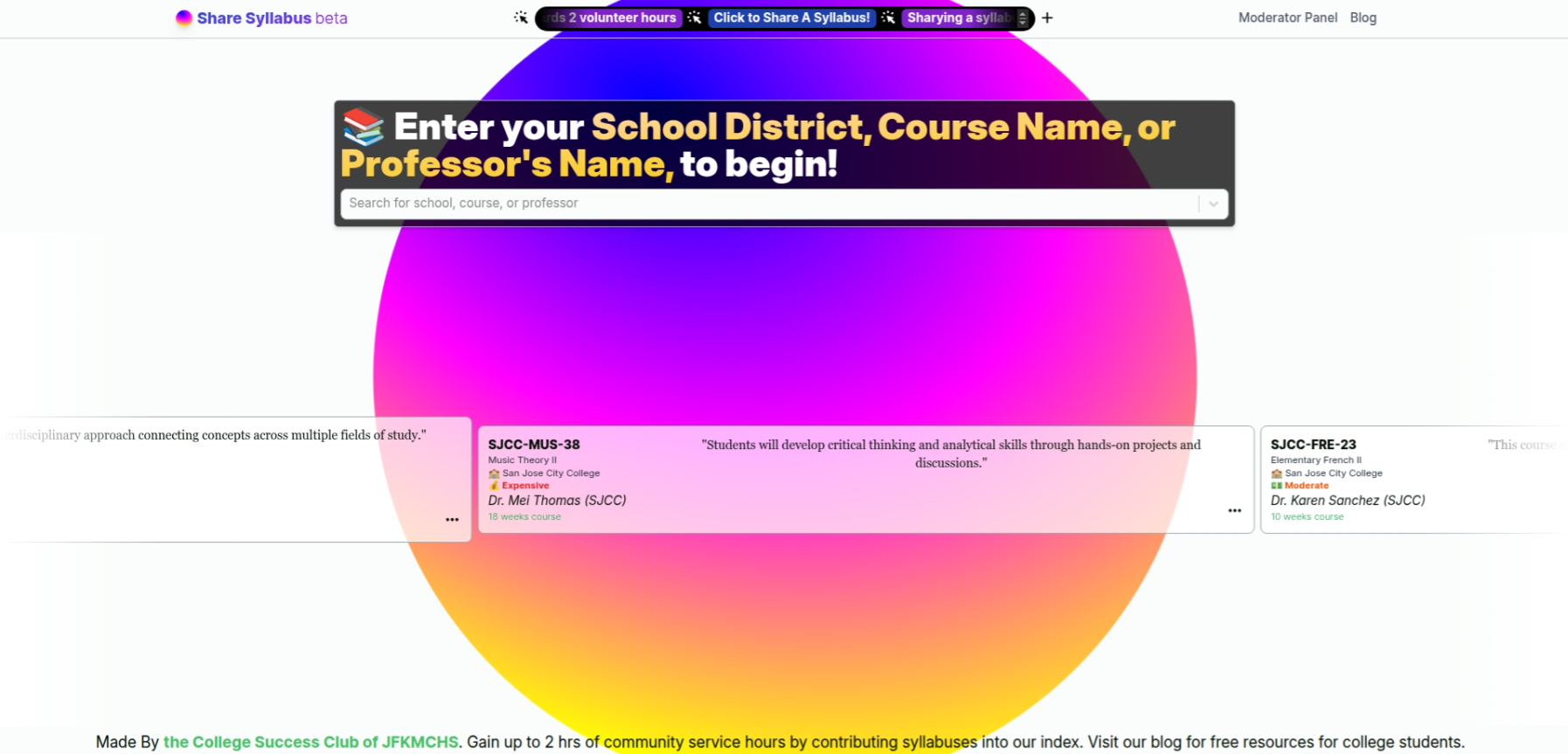
Going onto the archive of sharesyllabus.me (https://Leado123.github.io), you immediately are met with this big screen where you can see a Large gradient circle, and text saying for you to enter a “School District, Course Name, or Professor’s Name to begin!” Users would put in relevant information about a class they are interested in taking, or just curious about investigating, and then they would be presented with relevant information.
The Marquee (an element that scrolls in a loop) at the bottom is heavily inspired from Annas Archive, and it is meant to show that there is activity on this site, like syllabus entries being uploaded.

Notice on the bottom and top of the page, you see something saying that it is “Made By the College Success Club of JFKMCHS,” and that by sharing syllabuses, you could “Gain up to 2 hrs of community service hours by contributing syllabuses to our index.” This message is directly from last year, when I made it, where I used my College Success Club in order to attract people to submit syllabi by making it eligible for community service hours. The “Visit our blog for free resources for college students” message was part of a sideproject of College Success Club that was never started or completed, to create a comprehendium of education knowledge that would be useful to any student taking serious studies.
Clicking on any of the moving elements in the center of the homepage, or clicking through the search, would lead you to this page:

The purpose of this page was to allow users to quickly view the contents of a syllabus of a class. In fact, because of Vite for the frontend, the Cumulative Layout Shift (CLS) is only .74 seconds! You are quickly met with important metadata, such as the Name, Professor, Description, and Comment about the class (from a user who supposedly uploaded it). And if sharesyllabus.me was working, it would also show you a pdf of the syllabus (I also implemented a .docx in-browser viewer as well, which I unfortunately cannot show you due to technical constraints).
All of the syllabuses, classes, and professors you see here are generated with a script from a modified version of the server for this demonstration & archive located at my Gitea. Unfortunately, the PDFs and DOCx syllabuses cannot load due to how the server generated these random files, but in the future, I may decide to add that to the archived server.
Now onto the UX of searching for sharesyllabus.me. As some other parts of sharesyllabus.me, this UI/UX design is heavily inspired by Annas Archive, and a side-by-side comparison clearly shows that.


The search feature is actually a result of considerable time and effort. The backend interacting with the Prisma database had to use an external fuzzy-sort library to do quick and generalized approximate searches. The frontend needed to use a fancy debounce technique that took many React errors to figure out. But if you use it, it is quite nice.
Now onto the uploading portion of Sharesyllabus.me. The weird animating black button on the top of the sharesyllabus.me pages goes to a page in which users can upload a syllabus after they input high-quality metadata with autocomplete features:

The user is asked about the Class Name, Professor, etc. After they completed all of that, they could optionally add their Name and Email for the promised 2 community service hours. There aren’t really many more nuances I can explain about this part.
There is one more feature that I haven’t shared, and that is because it was never completely implemented. And that is the moderator dashboard. Because the site was essentially static, the login was tough to implement; we even hardcoded passwords for login at one point. Moderators would have access to an iframe that routes to a Prisma development database explorer, where they could implement changes to the database. This worked fine for a while, but then it became slow with more syllabi, and it was really reeking of security violations. I don’t have an image to show you of this feature because, for some reason, I am not able to re-implement it in its archived server, but here is an image of what the Prisma development database management GUI would look like embedded in the mod platform:

Of course, the prism of this image is very new. When I used Prisma ORM, they were still working on making their Studio less ugly.
There is nothing that comes to mind that may be found interesting about this project, but I think that it is important to summarize what we’ve learned about this project:
- Sharesyllabus.me is a collaborative and social platform for sharing syllabi & learning about classes
- It is heavily inspired by Anna’s Archive
- Syllabi must be uploaded manually, and metadata inputted manually, but at least there was a 2 hr community service incentive for high school students.
- The feature in which an automated Canvas Importer never took off or functionally worked for making importing syllabi easier, and also it is against terms of service.
I think that if sharing syllabi was a legal and honest way of sharing information about classes, sharesyllabus.me, with a little more work, could really have become an influential social platform. In any case, afromentioned serves as an explanation of what I have achieved with sharesyllabus.me